We are excited to announce the release of Lagom WHMCS Client Theme 2.4.6. This release brings an important change to how we support WHMCS: Lagom 2.4.6 is now fully compatible with both WHMCS 9.1.0 and WHMCS 8.13.7.
Alongside this, the update introduces new options for the domain ordering process, Invoice PDF improvements, a more readable Menu Manager, and a wide range of fixes across the client area and order process. It also lays the groundwork for our brand-new visual customization tool, Lagom Style Builder.
See Full Changelog Get It Now!
One Release, Two WHMCS Versions
Development Resumed for WHMCS 8.13.7
With the release of Lagom WHMCS Client Theme 2.4.6, we are officially resuming development for WHMCS 8.13.7. From now on, new Lagom releases will be delivered for both WHMCS 9.1.0 and WHMCS 8.13.7, with the same set of features, improvements, and fixes.
This means that whichever WHMCS version you are running, you will receive:
- New features and configuration options
- Bug fixes and appearance improvements
- Support for new Lagom tools, including Lagom Style Builder
Upgrade WHMCS on Your Own Terms
We understand that many of you are not ready to move to WHMCS 9.x yet. Upgrading a production billing system is a major decision that requires planning, testing, and confidence that every integration will keep working as expected. We don't want that decision to stand between you and the latest Lagom improvements.
That is why you can keep building your brand with Lagom on WHMCS 8.13.7 today, and move to WHMCS 9.1.0 whenever it makes sense for your business, without losing access to new Lagom updates along the way.
See Full Changelog Get It Now!
Meet Lagom Style Builder
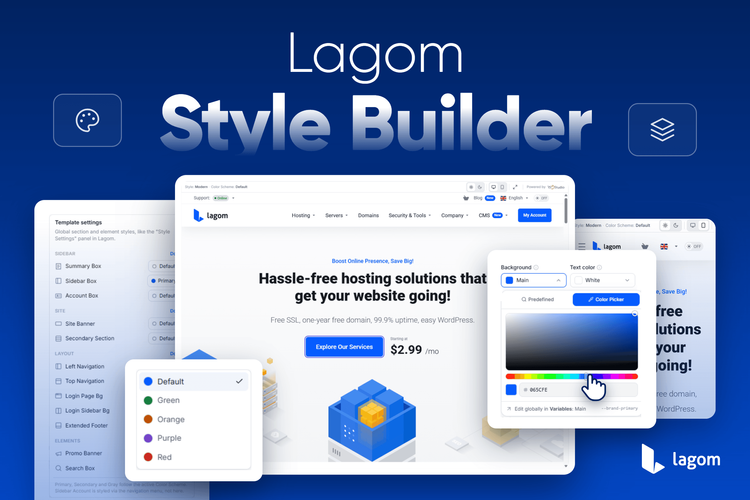
Lagom 2.4.6 is also the first release to support Lagom Style Builder, a brand-new browser-based visual editor that lets you design your own Lagom style with live preview. Pick your brand colors and fonts, fine-tune any Style Manager variable, preview your design on desktop and mobile, in Light and Dark Mode, and export a ready-to-import style for your WHMCS installation. No more guessing which variable changes what.
Style Builder works with both WHMCS 9.1.0 and WHMCS 8.13.7. All you need is Lagom 2.4.6 or newer. Want to see how it works step by step? We have prepared a dedicated article covering everything you need to know about Style Builder.
What's New in Lagom 2.4.6
Alongside full compatibility with both WHMCS versions, Lagom 2.4.6 introduces several new features that give you more control over the ordering experience and the documents your customers receive. Here are the highlights.
Custom Domain Options Order
Every hosting business has its own sales priorities. Some providers focus on registering new domains, while others mainly serve customers who transfer domains or use one they already own. Until now, the order of domain options on the Configure Product Domains page was fixed.
With the new Custom Domain Options Order option, you decide which domain option your customers see first. Put the most relevant choice at the top and guide customers toward the path that best fits your offer, making the ordering process quicker and more intuitive.
Domain Addons Checked by Default
Domain addons are a great way to increase the value of every domain order, but customers often skip them simply because they have to be selected manually. Lagom 2.4.6 adds an option to have selected domain addons checked by default on the Configure Domains page.
You choose which addons should be preselected, and customers can still uncheck them if they don't need them. This way, you can promote the services you recommend without adding extra steps to the order process.
And Much More
This release also includes a redesigned Menu Manager layout for easier management of larger menu structures, improvements to the client area and order process, and a number of bug fixes. Check the full changelog for the complete list of changes.
See Full Changelog Get It Now!
Update Today
Whether you are running WHMCS 9.1.0 or WHMCS 8.13.7, you can update to Lagom 2.4.6 today and enjoy the latest features, fixes, and access to Lagom Style Builder.
Here's a quick summary of the steps to safely and correctly update our products. It is crucial to follow each step carefully, as skipping or missing any part of the process may result in unexpected issues or disruptions to your system.
Step 1: Enable WHMCS Maintenance Mode
Before starting the update process, activate WHMCS Maintenance Mode to prevent customers from accessing the system during the update. This ensures no transactions or changes are made while the update is in progress.
To enable Maintenance Mode in WHMCS:
- Log in to your WHMCS admin area.
- Navigate to Setup -> General Settings.
- Click on the Other tab.
- Locate the Maintenance Mode section, check the box to enable it, and provide a message to inform customers about the temporary unavailability.
- Save your changes.
Maintenance Mode will now prevent users from accessing the client area until it is disabled.
Step 2: Backup Your WHMCS Installation and Databas
Create a full backup of your WHMCS installation files and database. This is a critical step to safeguard your data in case any issues arise during the update process.
Step 3: Check Server Requirements
Before updating, ensure your server meets the following product requirements.
If some of below requirements won't be meet this could lead to incorrect update, which would lead to restoring your server and starting the update again.
- IonCube Loader: Version 15 or later.
- PHP Version: Supported versions are PHP 8.2, PHP 8.3 and PHP 8.4.
- max_execution_time: Must be set to at least 300 seconds.
- max_input_vars: Must be set to at least 5000.
- Required PHP Modules:
- php-zip
- php-mbstring
Step 4: Perform the Update
Once the backup has been perfromed, and the server reuquirements has been checked, you can upload the files and start the update process.
Make sure that files won't be uploading using ROOT owner, as files and folders uploaded using root can not be overwritten by RS Themes addon. This will cause issues during update process, so please use different FTP account.
- Download the latest version of the product from the Client Portal.
- Extract the .zip file, which each product.
- Upload the content of the php8.2+ folder to your server, ensuring all existing files are replaced. Use FTP or your preferred file manager.
- Make sure that all the files has been correctly uplaoded and overwritten.
Next, follow the detailed instructions outlined in our documentation:
Step 5: Contact Support if Needed
If you encounter any issues or have questions during the update process, please contact our support team for assistance. Provide details about the problem and any error messages you encounter for faster resolution.
By following these steps, you can ensure a smooth and successful update of our products.